
Image SEO: What Google’s Own Documentation Actually Says

Most image SEO advice is a game of telephone: one blog paraphrases another, and by the tenth retelling the tips have drifted from anything Google actually said. So this guide goes to the source. Everything below comes from Google’s image SEO documentation, last updated March 2026, with the industry myths flagged where the two disagree.
There are some surprises in there, including one markup habit that makes images completely invisible to Google, and one widely-taught ranking factor that Google describes as barely mattering.
The mistake that makes your images invisible
Start with the one that silently costs the most traffic: Google doesn’t index CSS background images. Not “ranks them lower” or “struggles with them.” Doesn’t index them at all.
Google’s documentation is blunt about it, marking this as bad:
<div style="background-image:url(puppy.jpg)">A golden retriever puppy</div>
And this as good:
<img src="puppy.jpg" alt="A golden retriever puppy" />
This matters because modern page builders and themes love CSS backgrounds for hero sections, gallery tiles, and card thumbnails. If your best photography lives in `background-image` declarations, it exists for visitors and not for search. Google finds images in the src attribute of <img> elements, including inside <picture>, and nowhere else.
Alt text, using Google’s own good and bad examples
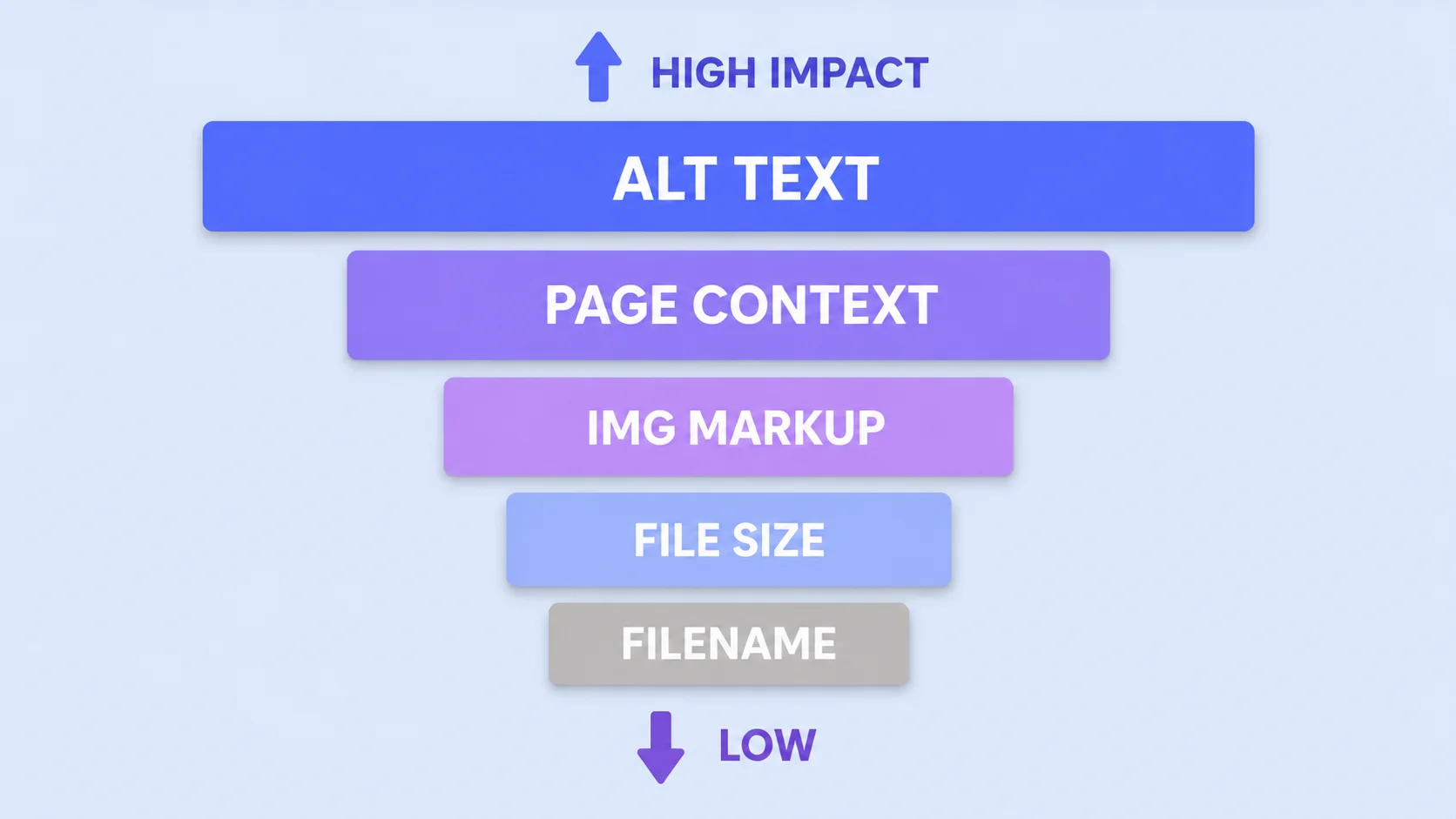
Alt text is the single most important piece of image metadata, and Google’s docs include a rare thing: a graded set of examples. Their progression, verbatim in spirit, for a photo of a puppy:
Where presets fall short: they apply the same numbers to every photo regardless of its exposure, so a filter that flatters a bright beach scene will crush a dim indoor shot. Treat the preset as a starting point and finish with the sliders, especially the black point, which varies most from photo to photo.
|
Grade |
Alt text |
Why |
|
Bad |
(missing entirely) |
No information for search or screen readers |
|
Bad |
“puppy dog baby dog pup pups puppies doggies…” |
Keyword stuffing; a spam policy violation |
|
Better |
“puppy” |
Accurate but thin |
|
Best |
“Dalmatian puppy playing fetch” |
Specific subject plus what’s happening |
The pattern in the “best” example is worth copying deliberately: specific subject + action or state. Not a keyword list, not a vague noun. And note that stuffing alt attributes isn’t merely ineffective; Google names it under keyword stuffing in its spam policies, which is a different category of risk entirely.
Two practical additions. Decorative images (spacers, purely ornamental flourishes) should carry an empty alt="" rather than no attribute, which tells screen readers to skip them. And if an image is a link, its alt text functions as the anchor text, so describe the destination rather than just the picture.
Filenames matter less than the industry claims
Here’s where popular advice and Google’s documentation part company. You’ll find guides asserting that Google weights the leading words of a filename more heavily, that filenames are a major ranking signal, that renaming your library will transform your traffic.
Google’s actual wording: the filename “can give Google very light clues about the subject matter of the image.” Light clues. The guidance is simply to use short, descriptive names, preferring my-new-black-kitten.jpg over IMG00023.JPG, and to avoid generic names like image1.jpg or pic.gif.
So rename your files, because it costs nothing and it does help a little. But if you’re choosing where to spend an hour, alt text and page context are worth vastly more than perfecting hyphenation. This is the clearest example of the telephone game in image SEO: a minor signal amplified into a major one through repetition.
Context beats metadata
The least-discussed line in Google’s documentation may be the most important: Google extracts information about an image from the content of the page, including captions and nearby text, and recommends placing images “near relevant text and on pages that are relevant to the image subject matter.”
Which means an image’s ranking potential is partly inherited from the page around it. A photo of a Dalmatian puppy on a page about dog training will outperform the same file dropped into an unrelated article, no matter how good its alt text is. Three consequences:
- Put images where the text explains them. An image three sections away from its relevant paragraph is weaker than one beside it.
- Captions are read. Google names captions explicitly as a source. If an image benefits from explanation, a caption does double duty for readers and crawlers.
- Reuse the same URL. If an image appears on several pages, reference it with one consistent URL so Google can cache it instead of re-crawling, which matters on larger sites with crawl budget limits.
Choosing which image Google shows
Google picks preview thumbnails automatically, but you can influence the choice, which most guides omit entirely. Two mechanisms, per the docs: the schema.org primaryImageOfPage property, or the og:image meta tag.
Google’s own best practices for that preferred image are worth quoting as rules: choose something relevant and representative of the page, avoid generic images like your site logo, avoid images with text in them, avoid extreme aspect ratios, and use high resolution where possible.
If you publish through WordPress, your featured image typically populates og:image automatically, which is exactly why the featured-image rules we follow (no baked-in text, centered subject, standard 1200×630 ratio) line up with Google’s guidance rather than being arbitrary. Structured data helps too: images in supported rich result types can earn a badge in Google Images, which is a visible differentiator in a grid of competitors.
Speed and formats, the half everyone forgets
Google’s image documentation devotes a full section to performance, noting that images are often the largest contributor to page size and pointing readers at PageSpeed Insights. Sharp, high-quality images are also called out as more likely to earn clicks from result thumbnails, which puts quality and weight in direct tension. Resolving it is the whole job:
- Supported formats: BMP, GIF, JPEG, PNG, WebP, SVG, and AVIF. Google also advises that your file extension match the actual file type.
- Compress to a target rather than by feel; our guide on compressing images for web has the KB numbers by image role.
- Serve responsive sizes with
srcsetor<picture>, and always include a plainsrcfallback, which Google explicitly recommends since some crawlers don’t parse the newer attributes. - Submit an image sitemap for images Google might not otherwise discover. Usefully, image sitemaps may include URLs on other domains, so CDN-hosted images can be declared this way.
Get your images light enough to rank
Compress to a target size and export web-ready formats. Free, in your browser.
Try the ArtsFlick CompressorThe image SEO checklist for every publish
What this reduces to, per image, before you hit publish:
- It’s an
<img>element with a realsrc, not a CSS background. - Alt text names the specific subject and what’s happening, in a natural phrase.
- Filename is short and descriptive, and you spent thirty seconds on it, not thirty minutes.
- The image sits beside text that’s about the same thing.
- Dimensions match the display size, and the file is compressed to a sensible target.
- Format is web-appropriate, with the extension matching the file type.
- Width and height attributes are set, so the layout doesn’t shift as it loads.
- If it’s the page’s key image, it’s your featured image or
og:image, with no text baked in.
One last thing worth knowing exists: if you’d rather Google not display your full-size images in results, the docs describe an opt-out based on the HTTP referrer header, where requests from Google domains receive a 200 or 204 with no content. Google still crawls the page and shows a thumbnail generated at crawl time, and this specifically isn’t treated as cloaking. Niche, but useful for photographers who want discovery without free full-resolution hosting.